
Features
Everything it does, nothing it doesn't need.
Passyble fills your logins, 2FA codes and passkeys on Windows, Android and in your browser, from one vault that's locked on your device.

Fills logins in
On Android, suggestions appear right on your keyboard. In your browser, a menu opens under the sign-in field. In Windows apps, press Ctrl+Alt+P and Passyble types the login for you.
How it worksKeeps 2FA codes with the login
The six-digit code is filled right after the password. When it can't be filled, a small window on Windows or a notification on Android shows it with a Copy button.
How it worksDoes passkeys too
Sign in without a password on Android 14 and later, in the browser, and on an up-to-date Windows 11. Passkeys follow your vault, so one made on your phone works on your PC.
How it worksSyncs where you say
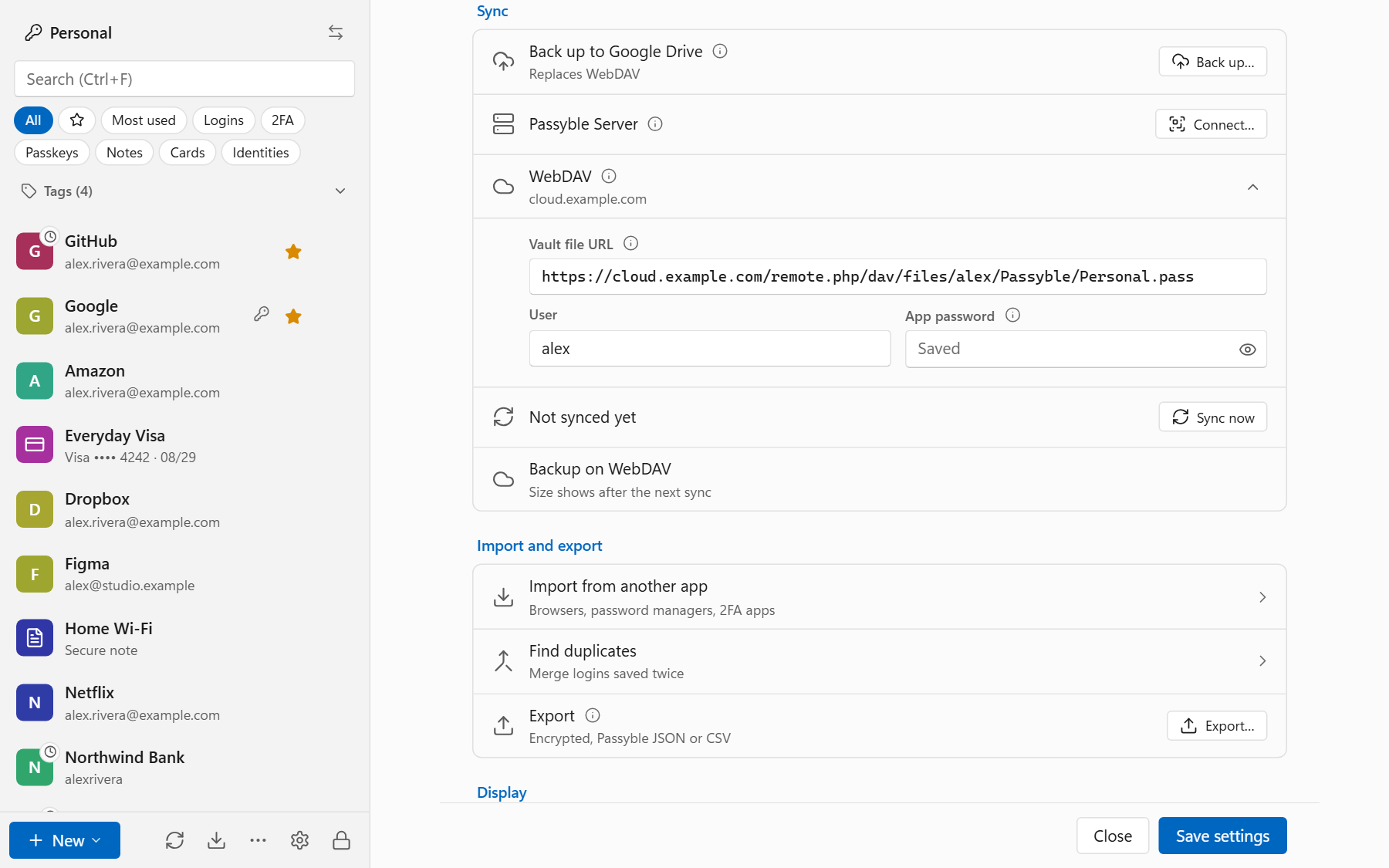
Your Google Drive, a OneDrive, Dropbox or Syncthing folder, your own cloud server like Nextcloud, or your own Passyble Server. Or nowhere at all. If two devices change the vault at the same time, Passyble merges the changes.
How it worksHolds more than passwords
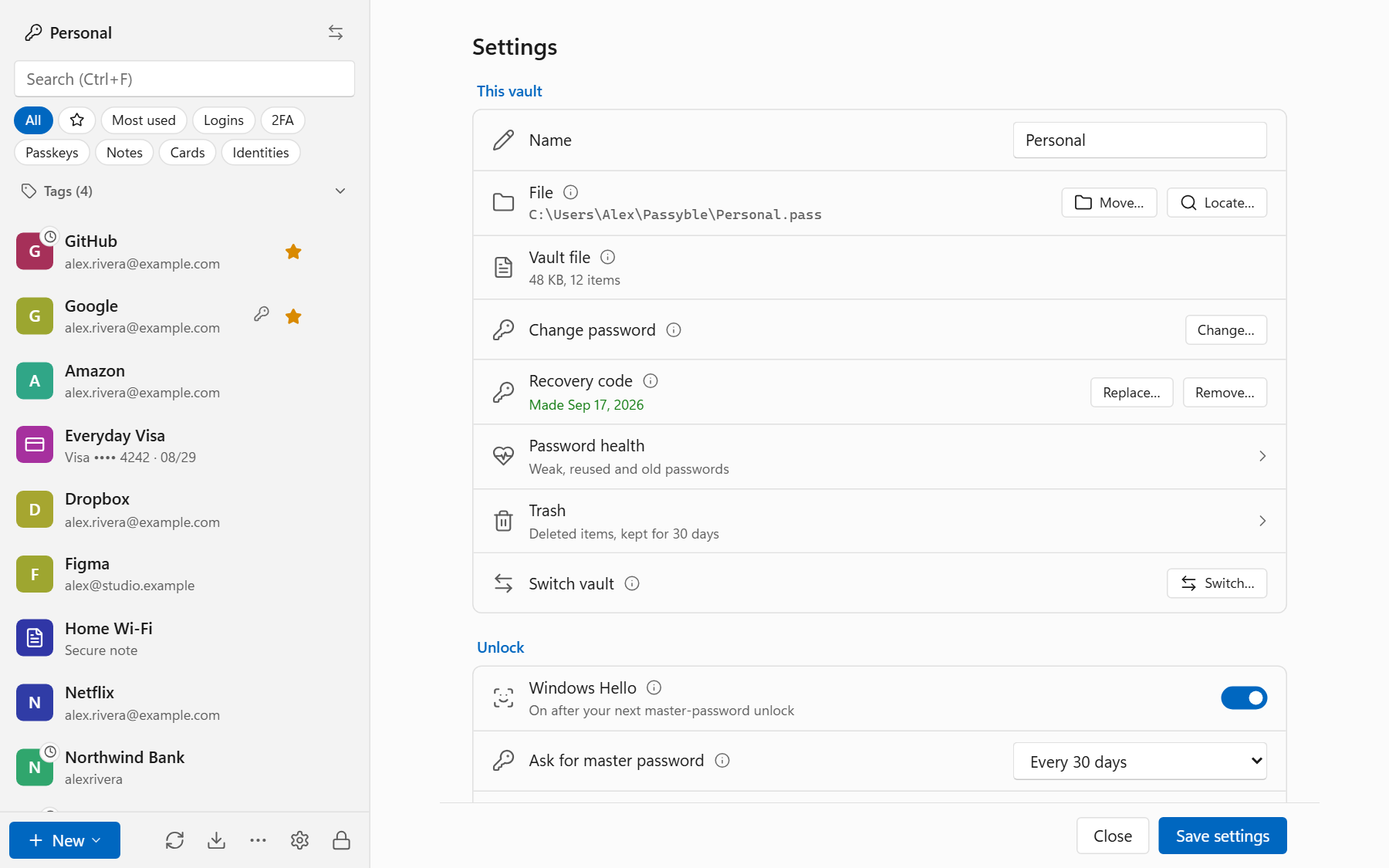
Secure notes, payment cards, addresses for forms, extra fields and tags. Deleted items wait in the trash for 30 days.
Points out the weak spots
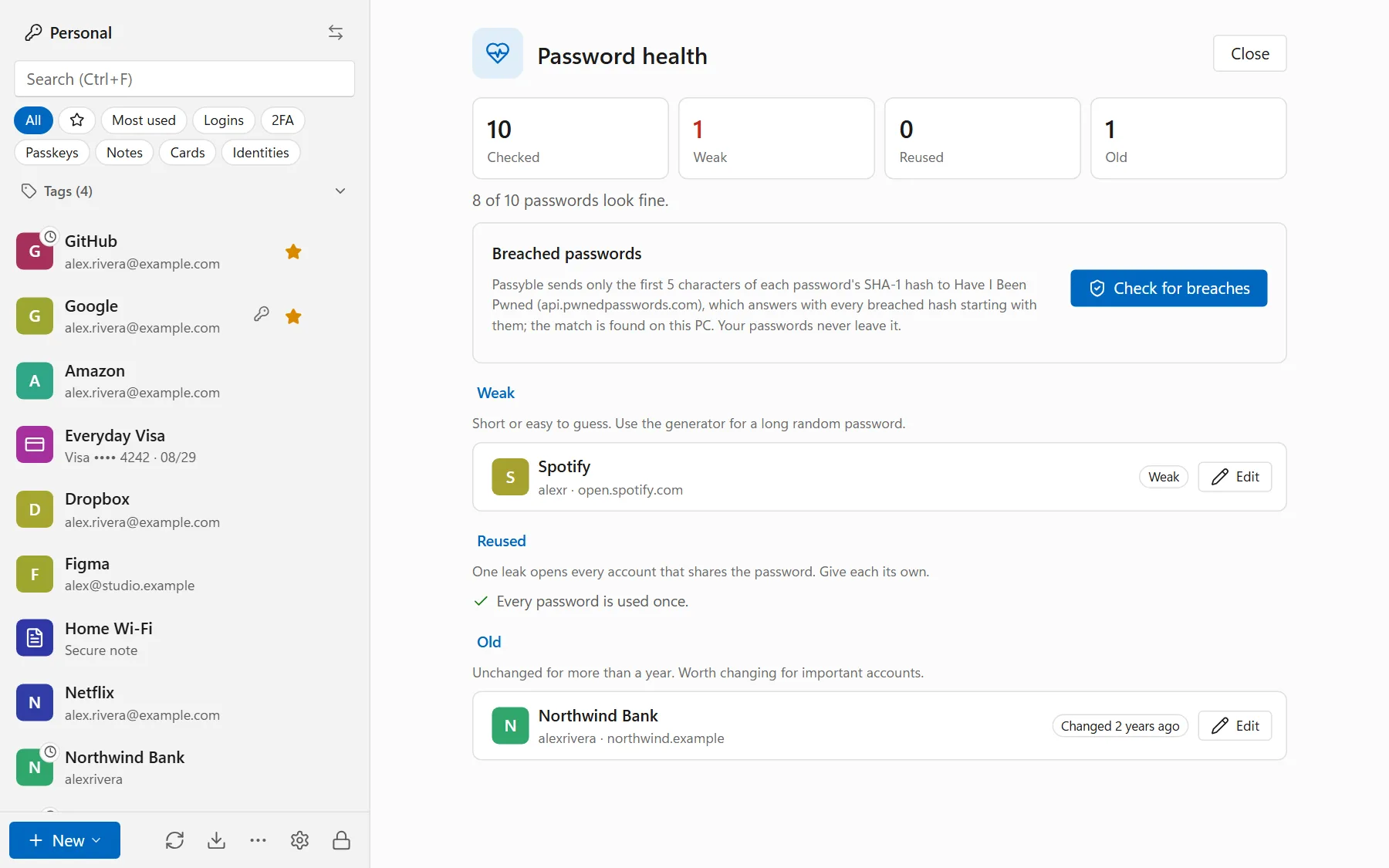
Password health shows passwords that are weak, reused or old. The optional breach check tells you which ones showed up in a known data leak.
How it worksMakes strong passwords
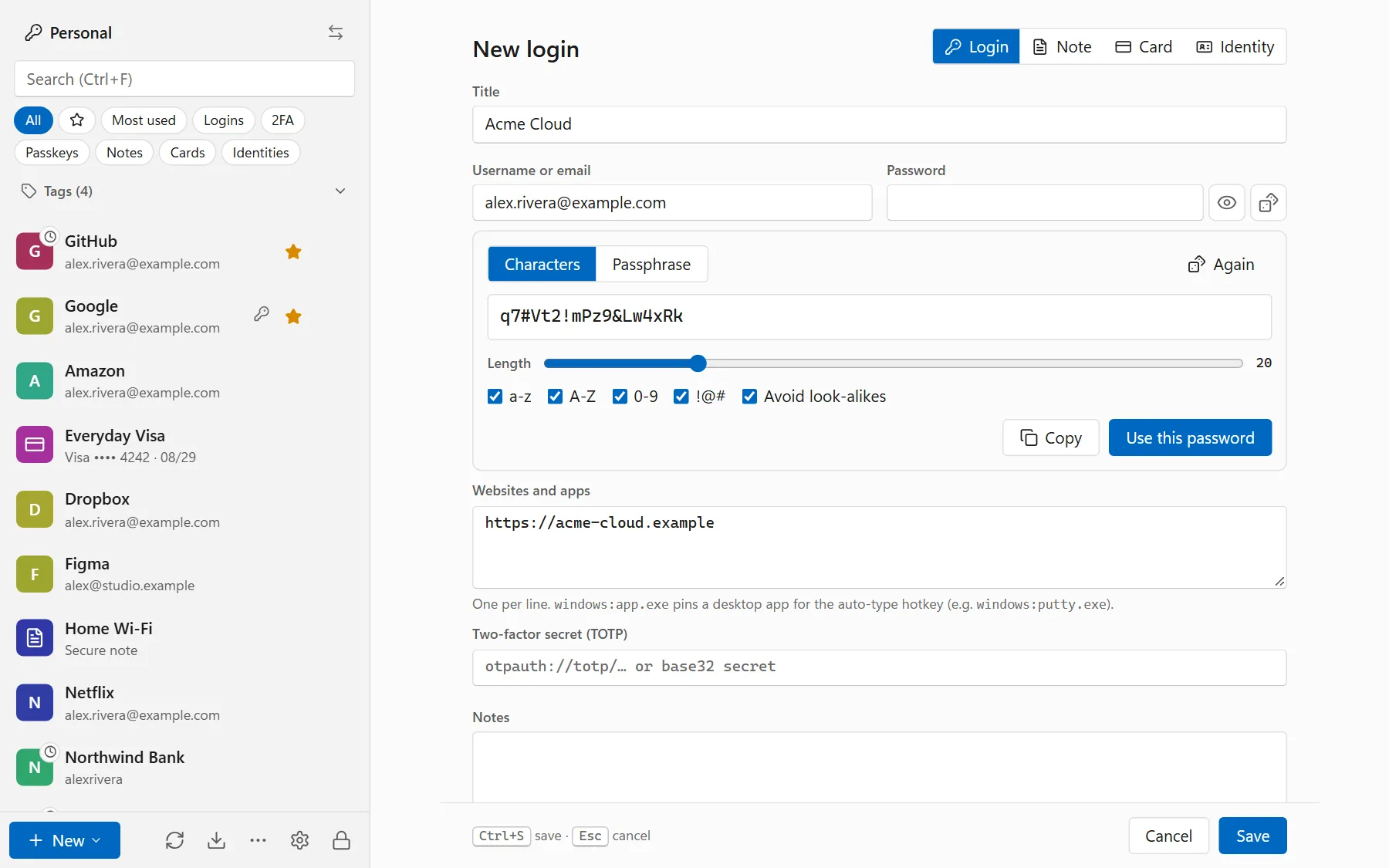
Random passwords of 8 to 64 characters, or easy-to-type passphrases, with an option to leave out look-alike characters. Try the password generator.
Moves your old vault over
Imports from Chrome, Edge, Brave, Firefox, Safari, Bitwarden, 1Password, Proton Pass, KeePassXC, LastPass, Dashlane, Google Authenticator, Aegis and 2FAS. The file is read on your device.
How it worksUnlocks with your face or finger
Windows Hello on the PC, fingerprint or face on Android. Every now and then Passyble still asks for the master password, so you don't forget it.
How it worksCleans up the clipboard
Copied passwords and codes are wiped from the clipboard after 45 seconds, and on Windows they stay out of clipboard history.
Locks itself
After 15 minutes without use, when you lock Windows and when the PC goes to sleep. The list of items can stay visible while locked, without any passwords.
Speaks nine languages
English, Spanish, French, German, Simplified Chinese, Japanese, Korean, Hindi and Indonesian.
Three apps, one vault.
Real screens, fake data. Every login below belongs to a made-up Alex Rivera.
Windows
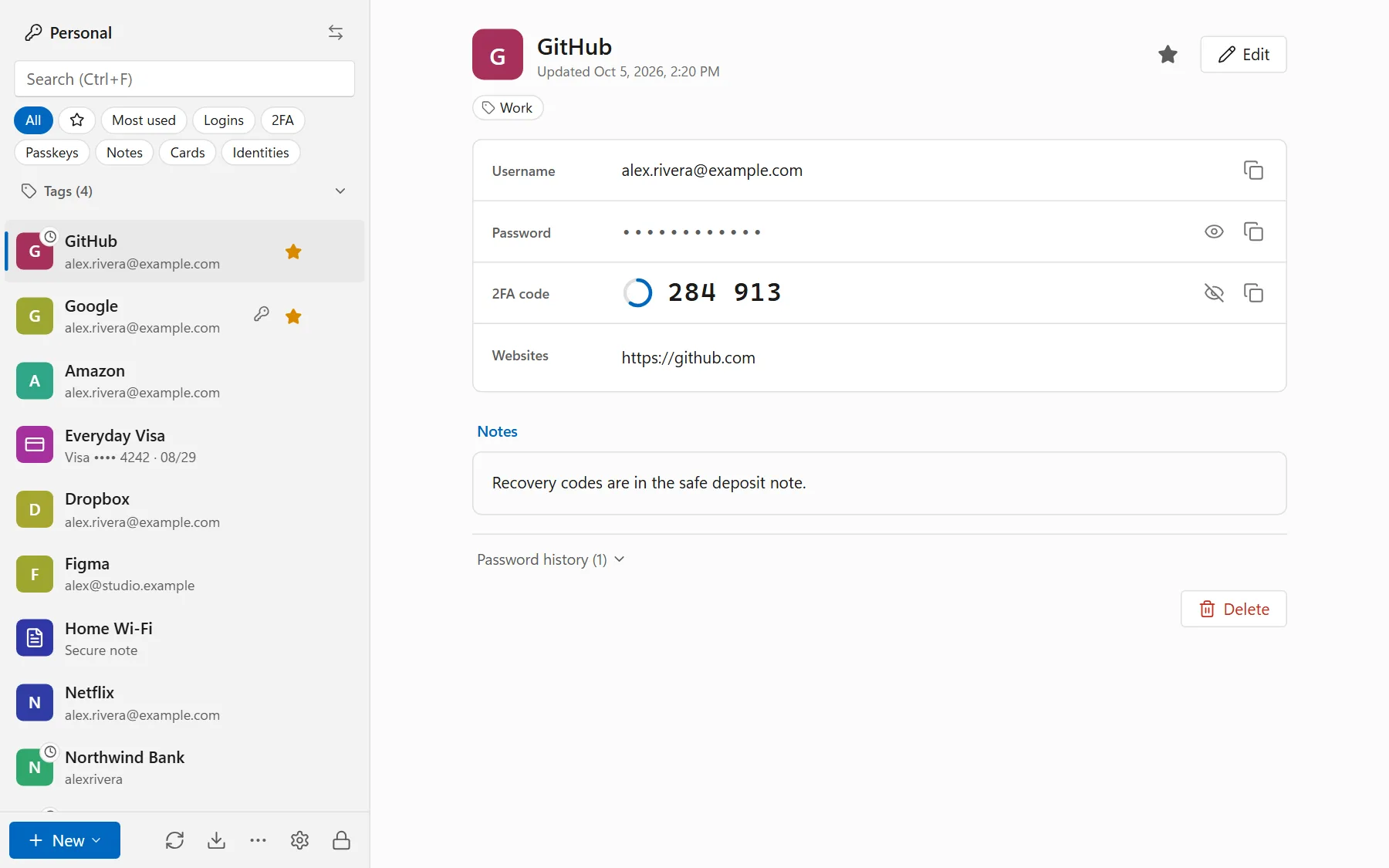
The Windows app keeps your vault. Find anything from the keyboard, make a password on the spot, and see which ones need replacing.
- Global hotkey that types logins into Windows apps
- Windows Hello unlock and a tray icon
- 2FA code popup with a Copy button
- Optional Windows 11 passkey provider
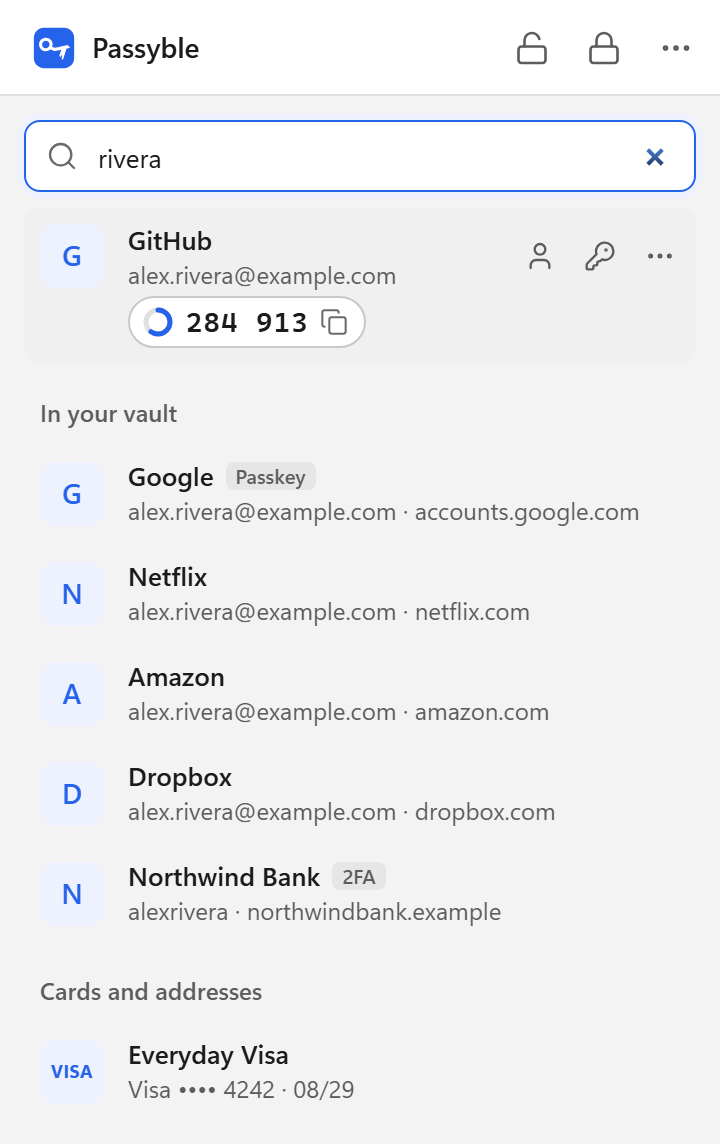
Browser extension
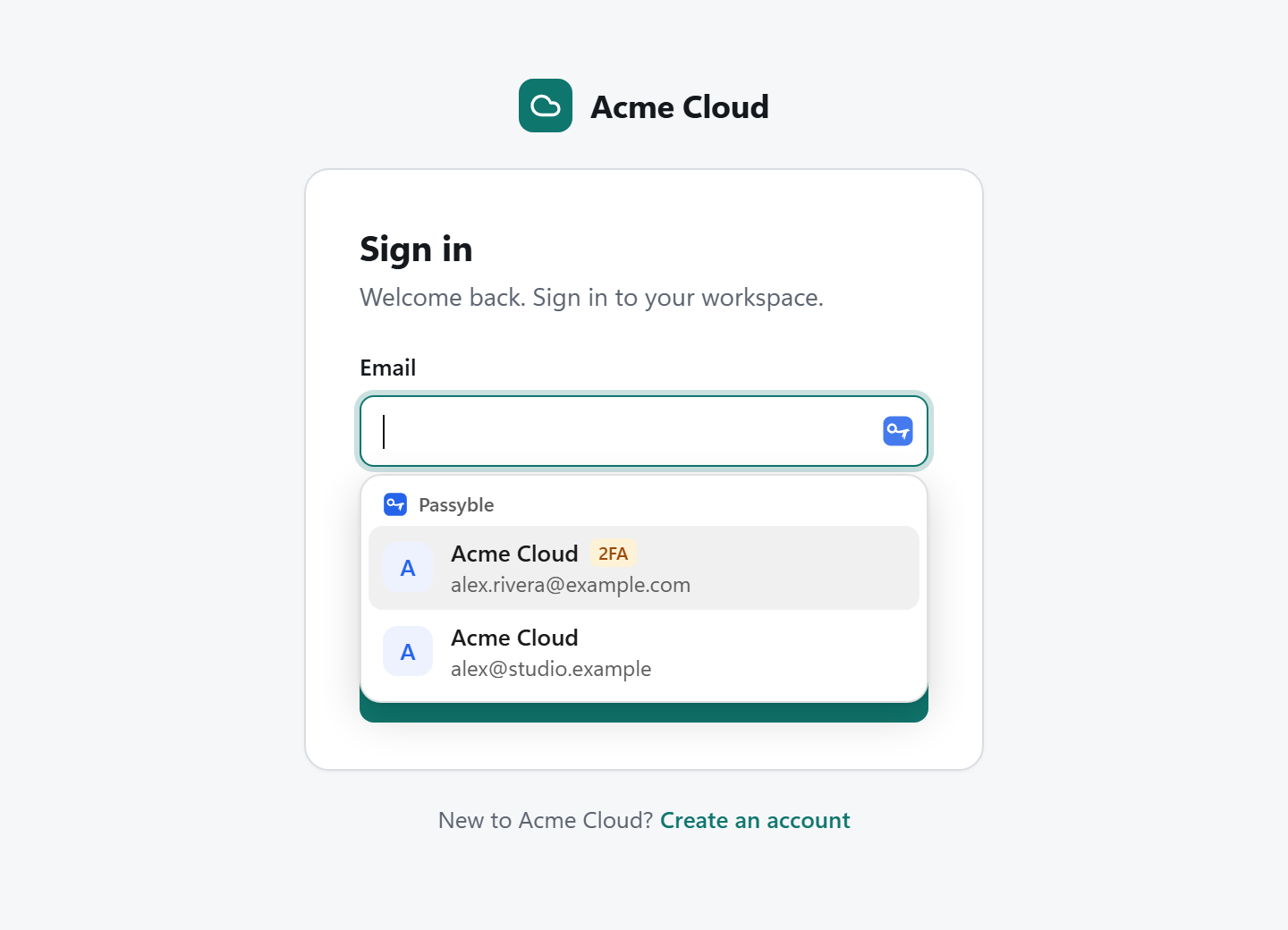
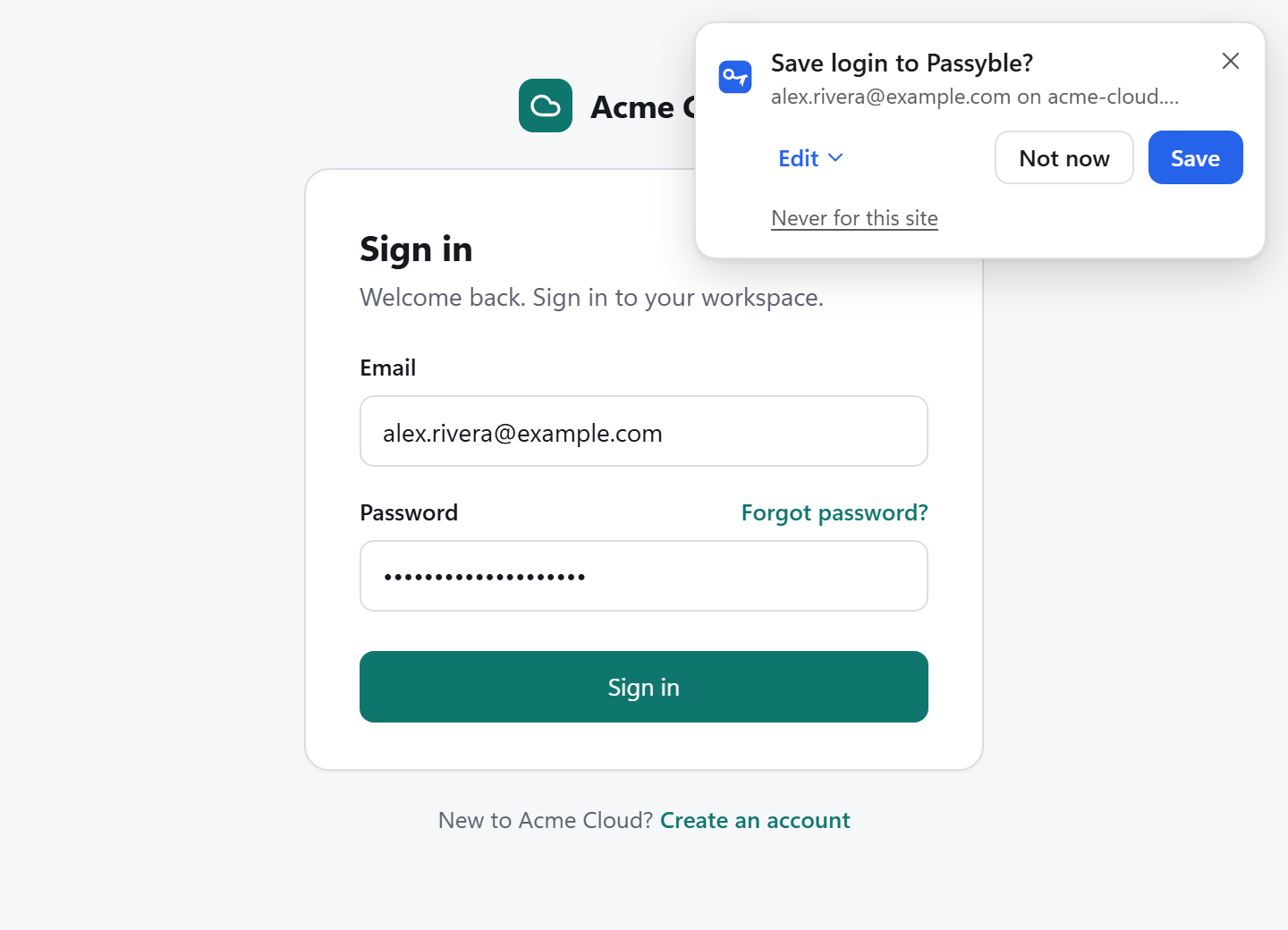
For Chrome, Edge, Brave and Firefox on Windows. It works with the Windows app, which keeps your vault, and offers the right login right in the form.
- Menu right under the sign-in field
- 2FA code filled after the password
- One login at a time, only for the site it's saved for
Android
Passyble for Android 9 and later fills apps and websites for you, with suggestions right on your keyboard.
- One tap from the keyboard to fill
- One-time code notification with Copy
- Fingerprint or face unlock
- Passkeys on Android 14 and later
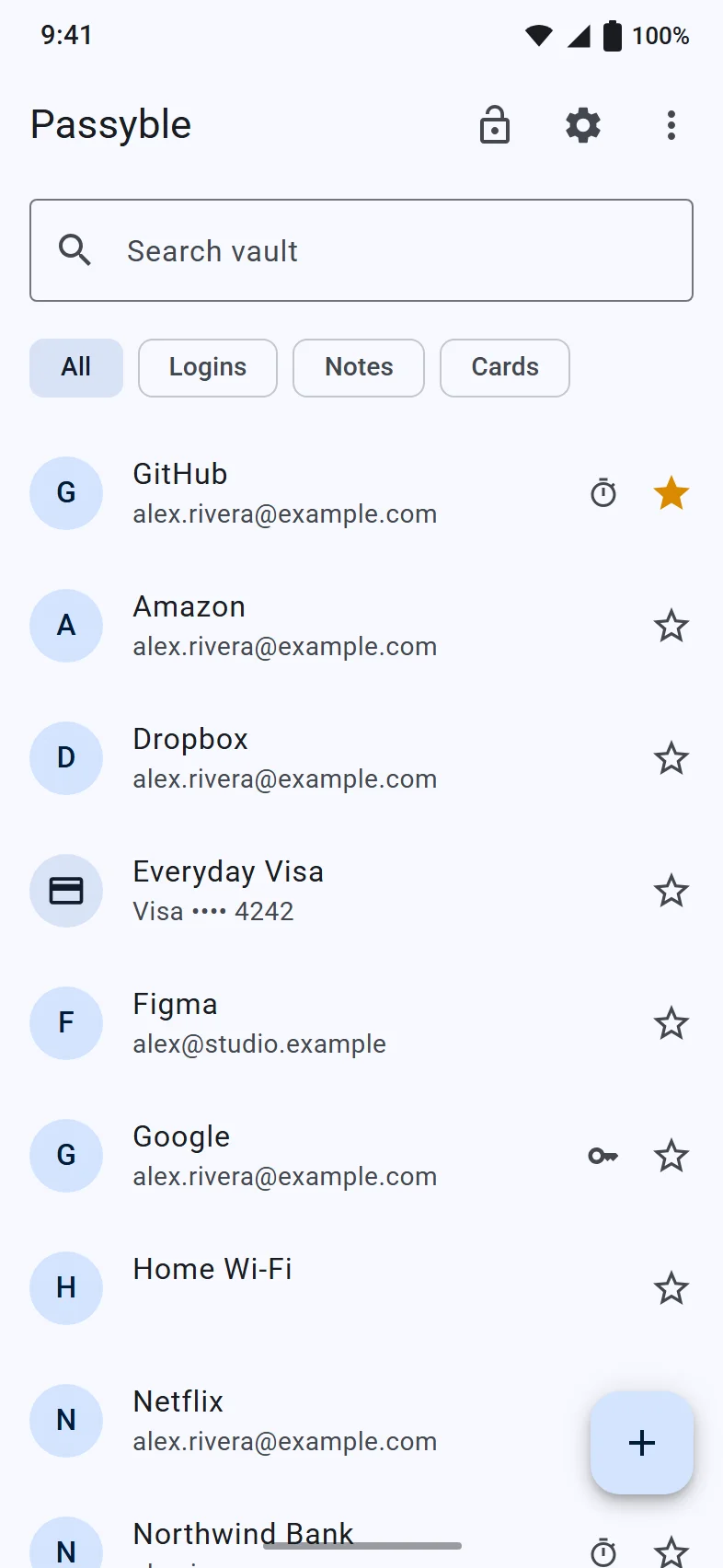
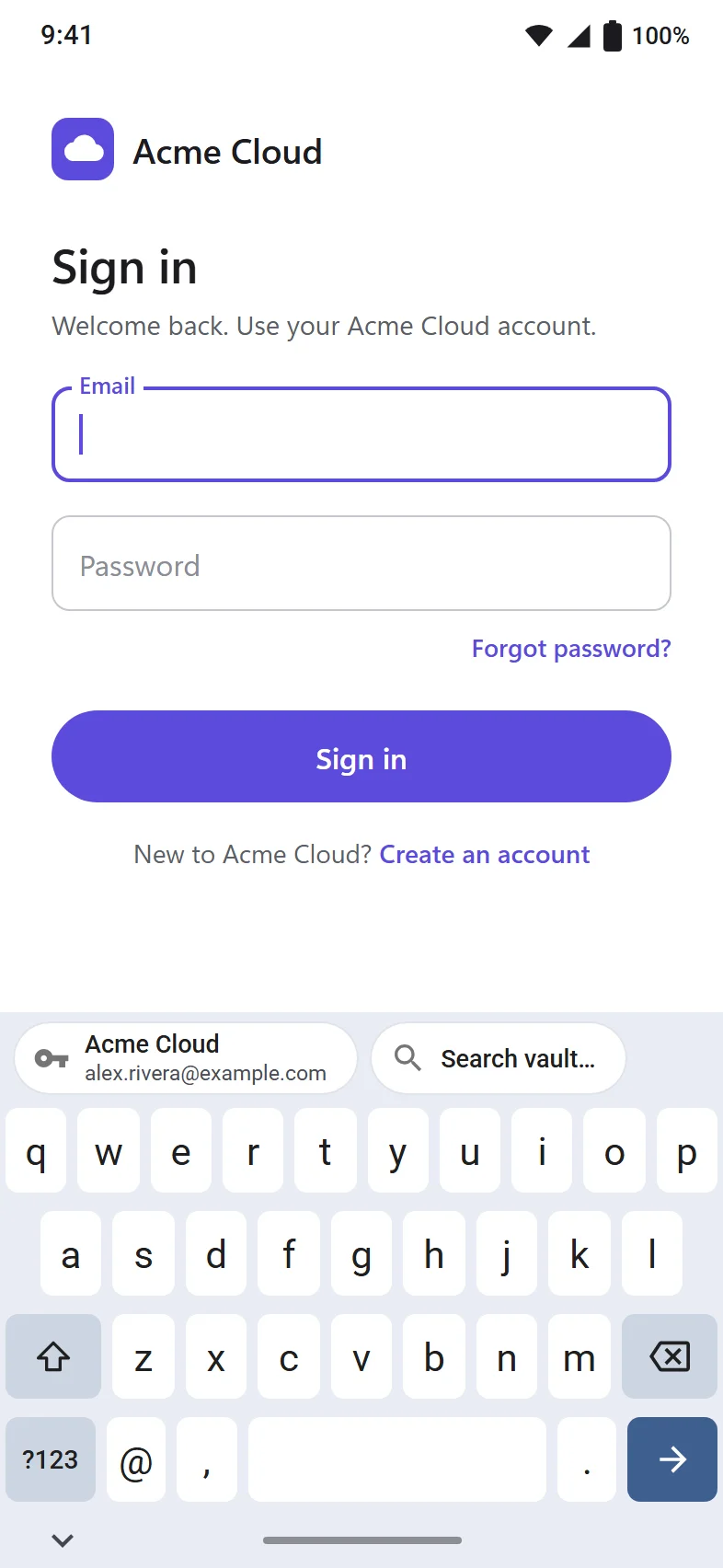
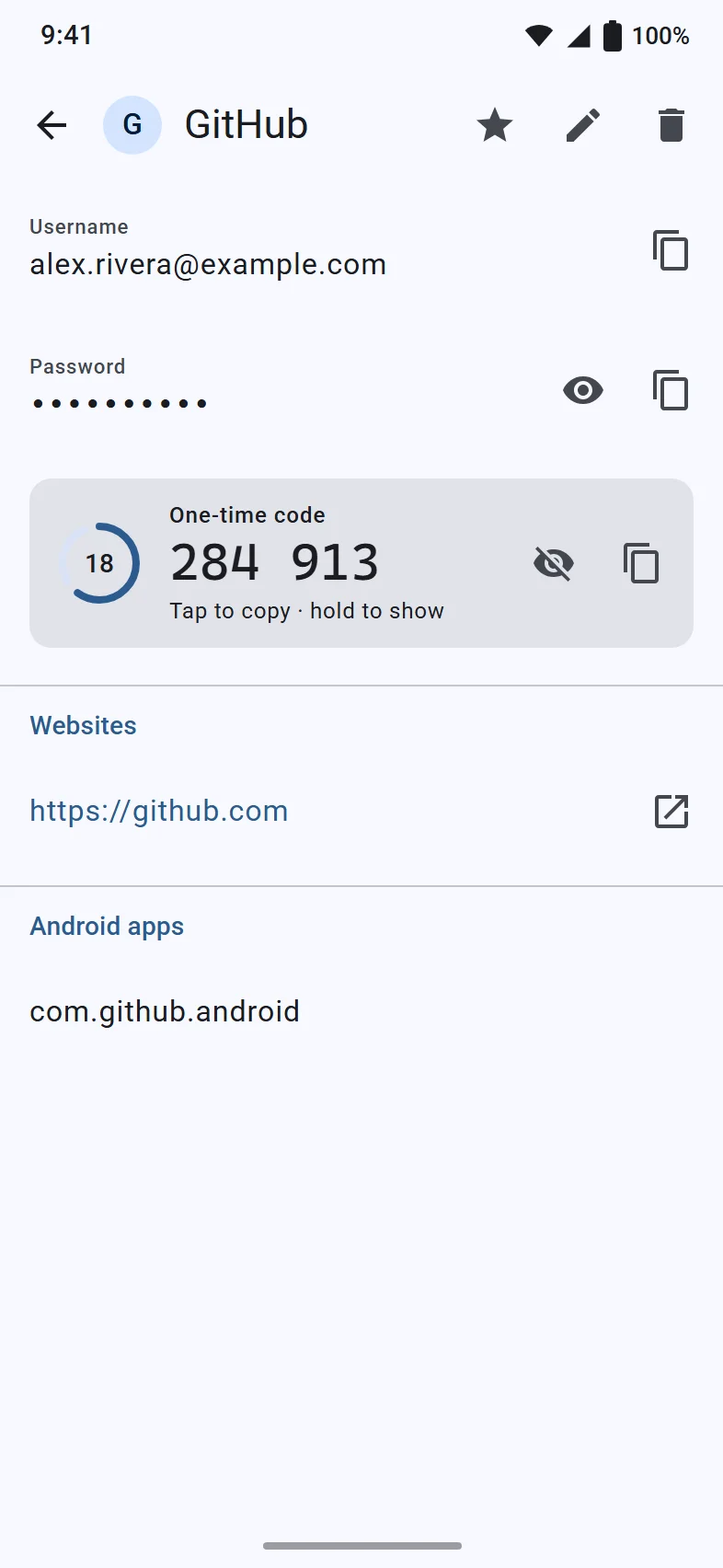
Fig. 6 to 8 The Android screens are design mockups of the app, with demo data.
More screens
Security and privacy
Your passwords are yours. We can't see them.
Here's how Passyble keeps your vault safe, in plain words.
- Locked before it leaves
- Your vault is locked with your master password on your own device. Without that password, the file is just scrambled data.
- We can't see your passwords
- There's no Passyble account and no Passyble cloud. Nothing from your vault ever comes to us: no passwords, no names, no usage data.
- The names are hidden too
- Not just passwords: site names, web addresses and usernames are locked as well.
- A private breach check
- Checking whether a password showed up in a data leak sends only a tiny scrambled piece of it, never the password itself.
Safe by default, every day.
The details that matter while you use it.
One password to remember
Your master password opens your vault. It never leaves your device, and nobody else ever gets it, not even us.
Unlock with your face or finger
Windows Hello on your PC, fingerprint or face on your phone. Your face or fingerprint never reaches Passyble; your device handles it.
Each site gets only its own login
The browser extension asks the Windows app for one login at a time, only for the site it belongs to. It keeps no passwords itself.
It locks itself
After 15 minutes without use, when you lock Windows and when the PC goes to sleep.
Copied passwords disappear
Anything you copy is wiped from the clipboard after 45 seconds.
No reset button, on purpose
Nobody can reset your master password, because nobody else has it. Make a recovery code ahead of time and keep it somewhere safe.
- Your sync storage
- Your locked vault file, only if you turn on sync, and only to the place you picked.
- Have I Been Pwned
- A tiny scrambled piece of each password, only when you click Check for breaches. It's a well-known service that collects leaked passwords.
- The websites themselves
- A request for a site's small icon, so your list looks familiar. You can turn this off.
- GitHub
- On Windows, a daily check whether a new version is out. New versions are checked before they install.
- Sensyble (us)
- Nothing. No account, no tracking, no crash reports.
Open source
Open, so anyone can check our work.
All of Passyble is open source: the Windows app, the Android app, the browser extension and Passyble Server.
What you can do
- Read it. Every part of every app, with nothing hidden.
- Check it. See for yourself how your vault is locked and what the apps send, or ask someone you trust to look.
- Build it. Make your own copy of the apps from the code.
- Change it. Fix a bug, add a feature, improve a translation, adapt it for your family or company.
- Share it. Pass on copies, changed or not, under the same license.
The one condition
If you share a changed version, or run a changed version for other people to use (for example your own modified Passyble Server), you have to share your changes too, under the same license. That keeps every version of Passyble as open as the original.
Why it matters for a password manager
Trust you can check
With the code open, "locked on your device" is something anyone can check, not just a promise.
You're never stuck
How the vault file and syncing work is written down with the code. If Sensyble stopped tomorrow, your vault would still open.
The code isn't public yet. We're getting it ready for GitHub, and this page will link straight to it the day it goes up. Until then, the GitHub link on this site goes to Sensyble's GitHub page.
Sensyble on GitHubLicense: GNU Affero General Public License, version 3 or later (AGPL-3.0-or-later). This is a summary, not legal advice; the license text itself decides.
The honest part.
Passyble is new and hasn't been checked by independent security experts yet.
That's one reason it's open source: once the code is on GitHub, anyone can check every claim on this page. Found something? Write to [email protected].
Technical details
- Locking the vault
- Your master password is turned into a key on your device with Argon2id (by default 64 MiB of memory, 3 passes, a random 16-byte salt). That key wraps a random 256-bit vault key. Each item is encrypted with XChaCha20-Poly1305 and a random 24-byte nonce.
- What stays readable
- To merge copies between devices, the vault file keeps random item ids, change times, a random device id and deletion markers in clear text. Titles, web addresses, usernames, passwords, notes and everything else are encrypted.
- Unlocking
- Windows Hello: the vault key on the PC is protected by a Windows Hello key kept in the TPM and needs a Windows Hello confirmation. Android: the key is kept in the Android Keystore behind your fingerprint or face.
- Breach check
- k-anonymity with Pwned Passwords: Passyble computes the SHA-1 hash of each password on your device, sends only its first 5 hex characters to api.pwnedpasswords.com (with padding) and compares the returned suffixes locally.
- Browser extension
- The extension talks to the Windows app through native messaging. It asks for one login at a time, and the app checks that the login belongs to the requesting site. The extension stores no secrets.
- Sync
- WebDAV (for example Nextcloud), a synced folder, a hidden app folder in Google Drive (drive.appdata), or Passyble Server. Only the encrypted vault file is uploaded; concurrent changes are merged per item.
- Clipboard
- Copied secrets are cleared after 45 seconds. On Windows they are excluded from clipboard history and cloud clipboard; on Android they are marked as sensitive.
- License
- GNU Affero General Public License, version 3 or later (AGPL-3.0-or-later).